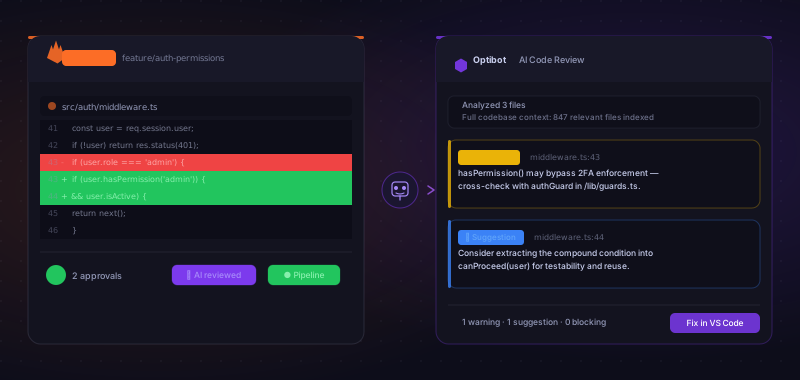
GitLab teams are underserved by the AI code review market. The most-publicized tools (GitHub Copilot Reviews, Cursor BugBot) are GitHub-only products. Many others list "GitLab support" in their feature matrix but deliver it as a bolted-on webhook integration: comments posted in the wrong thread format, re-reviews that silently skip new commits, and approval rules that the tool simply ignores. The gap between a tool built natively against the GitLab API and one that was adapted from GitHub logic is real and shows up in day-to-day use. If your team uses GitLab, whether on gitlab.com or a self-hosted instance, finding an AI code reviewer that actually works on your platform takes more research than it should.
This guide covers the six tools that genuinely support GitLab merge requests in 2026: Optibot, CodeRabbit, Greptile, Qodo, Amazon Q Developer, and SonarCloud. For each, we explain what "GitLab support" actually means in practice, where the gaps are, and what the real cost looks like for a typical engineering team. Two of the most popular tools in the category (GitHub Copilot and Cursor BugBot) are excluded because they do not support GitLab at all.
What to look for in a GitLab AI code reviewer
Not every tool that claims GitLab support delivers a GitLab-native experience. Before evaluating specific tools, it's worth knowing the three dimensions that separate first-class GitLab integrations from second-class ones.
Native merge request integration (not just GitHub PR ports)
GitLab uses merge requests (MRs), not pull requests. A tool with genuine GitLab support installs as a native GitLab integration, listens for MR events via the GitLab API, and posts inline comments in exactly the format GitLab reviewers expect: on specific diff lines, in the MR discussion thread, following GitLab's comment and approval model. Tools that port their GitHub PR logic to GitLab as an afterthought tend to miss things. They may not support GitLab's approval rules, may not re-review on new commits correctly, or may post comments in a format that breaks GitLab's native review UI. The test is simple: does the tool feel like it was built for GitLab, or does it feel like a GitHub tool that happens to connect?
Full codebase context (not just the MR diff)
The most important technical differentiator in AI code review (regardless of platform) is whether the tool analyzes the full codebase or just the changed lines in the MR diff. A diff-only reviewer catches style issues and straightforward bugs in the changed code. A full-context reviewer indexes your entire repository and understands how changed code affects other files, services, and dependencies. Cross-file dependency breaks, architectural regressions, and logic errors that only appear when you understand the surrounding system are invisible to diff-only tools. This distinction matters on GitLab just as much as on GitHub, and only a subset of the tools on this list get it right.
Engineering analytics for GitLab teams
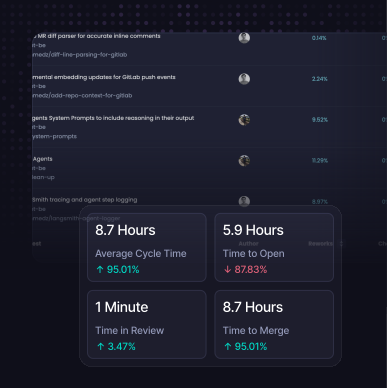
Most AI code review tools stop at the review comment. They tell you what's wrong with a specific MR but give you no visibility into patterns: how long MRs sit waiting for review, which engineers are bottlenecks, how your team's cycle time is trending, whether AI-generated code is actually shipping at a higher rate. Engineering analytics (PR cycle time, DORA metrics, AI adoption tracking, contributor insights) are the layer above individual reviews that helps teams improve systematically rather than one MR at a time. Very few tools include this alongside code review, and on GitLab, where teams often run self-hosted with less tooling around their workflow, this gap is felt even more.
The 6 best AI code review tools for GitLab in 2026
The only GitLab AI code reviewer with full codebase context and built-in engineering analytics
Optibot is the strongest AI code review tool for GitLab teams in 2026. It installs as a native GitLab integration via the GitLab API, not a webhook workaround, and posts inline review comments directly on merge requests. The installation connects through GitLab's first-party integration settings, meaning it respects GitLab's permission model and approval rules from day one. Every feature Optibot offers on GitHub is equally available on GitLab: full codebase indexing, multi-pass security scanning, autonomous CI fixing, and the complete engineering analytics suite. There is no reduced feature set or second-class experience for GitLab users.
The differentiator on review quality is full codebase context. Where other tools review only the MR diff, Optibot indexes your entire GitLab repository on every push and uses that context for every review. That means it catches cross-file bugs, architectural regressions, and dependency issues that diff-only reviewers never see, particularly valuable on large GitLab monorepos or services where a change in one file routinely affects behavior in five others. Flat $29/user/month pricing means costs stay predictable as your team ships more (not because your team grew, but because your velocity did).
Pros
- First-class native GitLab MR integration (cloud and self-hosted)
- Installs via GitLab's native integration settings, not webhooks
- Respects GitLab approval rules and re-reviews correctly on new commits
- Full codebase context (not diff-only) on every MR
- Engineering analytics: cycle time, DORA, AI adoption, contributor insights
- Multi-pass security scanning with CWE/CVE database matching
- Autonomous CI fixing agent for GitLab pipelines
- Flat $29/user/month, unlimited MR reviews
- VS Code and Cursor IDE extensions for fix resolution
- SOC 2 Type II certified
Cons
- No Bitbucket or Azure DevOps support (in development)
- No free tier for open-source repositories
Broad platform support with GitLab cloud and self-hosted, but usage-based pricing
CodeRabbit is one of the most widely-deployed AI code review tools in 2026 and offers GitLab support for both GitLab.com cloud and self-hosted instances. It installs via the GitLab integration marketplace, which makes initial setup straightforward for teams already familiar with GitLab's integration catalog. The GitLab feature set covers the core workflows: it handles re-reviews when new commits are pushed, supports GitLab CI pipeline comments, and is one of the few non-Optibot tools where the GitLab offering is close to its GitHub feature set. That said, GitLab-specific behaviors like merge request approval rules are not fully accounted for, and teams have reported edge cases where approval state does not reset as expected after a re-review, a gap that does not exist in Optibot's native GitLab integration.
CodeRabbit maintains a semantic index of your codebase (including dependency graphs and function embeddings) so it operates with more context than a pure diff-only reviewer. The depth and comprehensiveness of cross-file bug detection, however, differs from purpose-built full-context tools like Optibot and Greptile, which index the full repository as their core analysis approach rather than as a supplementary feature. The other drawbacks are consistent regardless of platform: engineering analytics are absent (no cycle time tracking, no DORA metrics, no AI adoption insights), usage-based pricing means your bill grows directly with your team's MR volume, and there are no IDE extensions for resolving review findings directly in your editor.
Pros
- GitLab cloud and self-hosted support
- Installs via the GitLab integration marketplace
- Covers core GitLab MR workflows (re-reviews, CI comments)
- Generous free tier for open-source projects
- Broad platform support (also GitHub, Bitbucket, Azure DevOps)
Cons
- Usage-based pricing scales with MR volume
- No engineering analytics or cycle time tracking
- No IDE extensions for fix resolution
- Occasional edge cases with GitLab approval reset on re-review
Strong full-context review quality on GitHub, but GitLab is secondary
Greptile is a technically strong AI code reviewer that uses full codebase indexing rather than diff-only analysis, making its review quality genuinely competitive for logic bugs and cross-file issues. On GitHub, it is one of the best options for teams that want deep review without engineering analytics. The problem for GitLab teams: Greptile is primarily a GitHub-focused product, and "limited GitLab support" in practice means several specific gaps. GitLab cloud (gitlab.com) is supported at a basic level, but the integration is set up via webhooks rather than GitLab's native API, which means re-review behavior on new commits is unreliable and GitLab approval rule integration is absent. Self-hosted GitLab support requires manual configuration and is not offered as a standard setup path.
If your team is on GitLab cloud and review quality is the top priority, Greptile is worth evaluating, but verify current GitLab feature coverage before committing, as the integration has been a known gap. Teams have reported that comment threading on GitLab MRs does not always match the inline format GitLab reviewers expect, which creates friction in the review workflow. For self-hosted GitLab or teams that need engineering analytics, Optibot is the more reliable choice. Greptile uses usage-based pricing and has no engineering metrics layer.
Pros
- Full codebase context, strong review quality on complex codebases
- GitLab cloud support available
- Strong cross-file bug detection
Cons
- Primarily GitHub-focused; GitLab is secondary
- GitLab integration uses webhooks, not native GitLab API
- Re-review on new commits unreliable on GitLab
- No GitLab approval rule integration
- Self-hosted GitLab requires manual setup; not a standard path
- No engineering analytics or productivity metrics
- Usage-based pricing
- No VS Code or Cursor extension
GitLab support available on enterprise tiers, strongest value for governance-heavy orgs
Qodo (formerly CodiumAI) offers both a coding assistant (Qodo Gen) and a dedicated PR/MR review product (Qodo Merge). GitLab support is available, but it is gated behind higher-tier enterprise plans. Teams on the free or lower paid tiers may find GitLab support unavailable or limited. For enterprise organizations on GitLab with strict governance requirements, Qodo's rules engine is a standout feature: teams can define and enforce custom coding standards across all merge requests, which is valuable for large regulated environments.
The tradeoffs are significant for most teams. The dual-product setup (coding assistant plus MR reviewer) adds configuration complexity. Qodo does not offer engineering analytics. Pricing is less transparent than Optibot or CodeRabbit, and the entry point for full GitLab support typically requires enterprise negotiation. For teams that need Bitbucket or Azure DevOps alongside GitLab and have the compliance requirements to justify the setup complexity, Qodo is worth evaluating. For most GitLab teams, Optibot or CodeRabbit will be simpler and more cost-effective.
Pros
- GitLab support (enterprise tier)
- Strong rules engine for enforcing coding standards
- Also supports GitHub, Bitbucket, and Azure DevOps
- Enterprise governance and compliance features
Cons
- GitLab support gated to enterprise plans
- Complex dual-product setup vs. Optibot or CodeRabbit
- No engineering productivity metrics
- Less transparent pricing; enterprise negotiation required
"For GitLab teams, 'GitLab support' means wildly different things across tools: from a first-class native integration to a webhook that posts comments in the wrong format. Always test on a real MR before committing to a tool."
Limited GitLab support; most value for AWS-heavy codebases on the AWS ecosystem
Amazon Q Developer (formerly CodeWhisperer) includes code review capabilities and does have some GitLab integration, but it is limited compared to its GitHub support. The primary strength of Amazon Q Developer is its AWS-specific context: it understands CDK, CloudFormation, IAM, Lambda, and other AWS service patterns, and can flag infrastructure misconfigurations at the code level. For GitLab teams running AWS-heavy infrastructure-as-code, this AWS-specific context is a genuine differentiator that tools like Optibot do not replicate in the same depth.
Outside the AWS ecosystem, Q Developer's advantages largely disappear. General application code review quality is on par with basic diff-only tools, adequate for straightforward coverage but not competitive with full-context reviewers. The GitLab integration is not as polished or feature-complete as Optibot's or CodeRabbit's. Teams not deeply invested in AWS will find more value in the other tools on this list.
Pros
- Strong AWS-specific scanning (IAM, S3, CDK, CloudFormation)
- Free tier for individual developers
- JetBrains, VS Code, and Cloud9 IDE integrations
- Some GitLab support
Cons
- Limited GitLab integration, not feature-complete
- Strong value only for AWS-heavy codebases
- No full codebase context for MR review
- No engineering analytics
- AWS ecosystem dependency
GitLab CI integration for static analysis and security quality gates, not a contextual AI reviewer
SonarCloud is the cloud edition of Sonar's widely-used static analysis platform, and it has solid GitLab support via CI pipeline integration. When configured, SonarCloud runs on GitLab pipelines and posts quality gate results and security hotspot findings as MR decoration. It is mature, battle-tested, and genuinely effective for enforcing code quality thresholds: blocking merges on coverage regression, detecting OWASP vulnerability patterns, and flagging code smells at scale. The GitLab integration is well-documented and widely used.
The key distinction: SonarCloud is a static analysis tool, not an AI contextual reviewer. It does not understand your codebase or the intent of a change. It pattern-matches against known rules. It will not catch the class of logic bugs and architectural regressions that full-context AI reviewers like Optibot detect. The most common deployment pattern is using SonarCloud as a CI quality gate alongside an AI reviewer: SonarCloud enforces OWASP/CWE compliance and coverage thresholds, while Optibot or CodeRabbit catches the logic and design issues that require codebase understanding.
Pros
- Solid GitLab CI pipeline integration
- Mature static analysis with 30+ languages
- Strong OWASP/CWE security hotspot detection
- Free tier for public open-source repositories
- Quality gate enforcement blocks unsafe merges
Cons
- Static analysis only, no AI contextual understanding
- Misses logic bugs and architectural regressions
- No narrative inline review comments
- No engineering productivity or cycle time analytics
- High false-positive rate on complex business logic
Using GitLab and want to try Optibot? Optibot's native GitLab integration takes under 10 minutes to set up. Full codebase context, inline MR comments, and engineering analytics, all on your GitLab instance.
Important: GitHub Copilot and Cursor BugBot do not support GitLab. These are two of the most frequently mentioned AI code review tools in 2026, but both are exclusively GitHub products. GitHub Copilot Code Review requires a GitHub account and only works on GitHub.com or GitHub Enterprise. Cursor BugBot is designed for GitHub pull requests and does not integrate with GitLab merge requests. If you encounter recommendations for either tool in a GitLab context, those recommendations are incorrect. GitLab teams need to use tools from the list above.
Quick comparison: all 6 tools at a glance
| Tool | GitLab MR comments | Full context | Eng. analytics | Self-hosted GitLab | Pricing |
|---|---|---|---|---|---|
| Optibot | ✓ Native | ✓ | ✓ | ✓ | $29/user flat |
| CodeRabbit | ✓ | Partial | ✗ | ✓ | Usage-based |
| Greptile | Partial | ✓ | ✗ | Limited | Usage-based |
| Qodo | ✓ (Enterprise) | ✓ | ✗ | ✓ (Enterprise) | Enterprise pricing |
| Amazon Q Developer | Limited | ✗ | ✗ | Partial | $19/user / free tier |
| SonarCloud | Via CI gate | ✗ | ✗ | Via CI only | Usage (lines of code) |
GitLab-specific considerations
GitLab self-hosted vs cloud: different integration requirements
Many GitLab teams run self-hosted instances, on-premises, in a private cloud, or in an air-gapped environment. The reasons are consistent: compliance requirements (SOC 2, ISO 27001, HIPAA), data residency obligations, security policies that prohibit external SaaS access to source code, or organizational preference for infrastructure control. Self-hosted GitLab has fundamentally different integration requirements from gitlab.com. Tools that connect to the GitLab cloud API cannot simply connect to a private instance without an on-premises agent, a network allowlist, or a dedicated self-hosted integration path.
When evaluating AI code review tools for a self-hosted GitLab instance, the key questions are: Does the tool offer a dedicated self-hosted integration or agent? Does it require your source code to be transmitted to an external server, or can it run analysis on your own infrastructure? What are the data handling and security certifications? Teams running air-gapped instances have also encountered tools that work on cloud GitLab but silently fail on self-hosted because they depend on outbound webhook delivery that the private network blocks. Optibot and CodeRabbit both support self-hosted GitLab. Qodo supports it on enterprise tiers. Greptile's self-hosted GitLab support is limited. SonarCloud's self-hosted equivalent is SonarQube (the on-premises product), which is a separate product entirely.
Merge request workflows vs GitHub pull requests
GitLab merge requests and GitHub pull requests are functionally similar but differ in important workflow details that a native integration needs to handle correctly. GitLab's approval system works differently from GitHub's. It supports required approvals, approval rules by role or CODEOWNERS, and approval reset on new commits. GitLab's discussion resolution model differs from GitHub's. GitLab CI/CD pipeline integration, MR status checks, and the GitLab API event model all have their own patterns that a purpose-built integration must implement correctly.
Tools that port their GitHub integration to GitLab without rebuilding for the GitLab API model often have subtle failures. A common issue is re-review behavior: on GitHub, most tools correctly post an updated review when new commits are pushed; on GitLab, tools using webhook-based integrations sometimes skip re-reviews entirely or post duplicate comment threads. Another common gap is approval handling: GitLab allows approvals to be automatically revoked when new code is pushed, and tools that do not account for this can leave an MR in an approved state after the author has pushed a significant change. Optibot's GitLab integration was built natively against the GitLab API, not adapted from GitHub logic, which is why the MR experience is fully consistent with how GitLab teams already work.
Questions to ask a vendor about their GitLab support
Before committing to any tool, ask these questions directly. The answers will quickly distinguish native GitLab integrations from GitHub ports with thin GitLab wrappers.
- Does your integration use the native GitLab API or a webhook? Webhooks are a signal of a ported integration; native API usage means the tool was built for GitLab.
- Does your tool handle GitLab approval resets on new commits? GitLab can auto-revoke approvals when new code is pushed. Ask whether the tool accounts for this in its review flow.
- Do re-reviews trigger correctly when a new commit is pushed to an open MR? This is a known failure point for webhook-based integrations on GitLab.
- Do you support GitLab self-hosted without requiring outbound internet access? Critical for air-gapped or private cloud deployments.
- Are all features available on GitLab, or is there a reduced feature set compared to your GitHub integration? Many tools quietly omit analytics, CI integration, or inline comment support on GitLab.
- What GitLab versions do you support? Self-hosted GitLab instances are often one or two versions behind; confirm the tool supports your specific version.
Our recommendation for GitLab teams
For most GitLab teams (whether on gitlab.com or self-hosted), Optibot is the clear recommendation. It is the only tool on this list that combines three things GitLab teams actually need: a first-class native MR integration built for GitLab and not ported from GitHub; full codebase context that catches the bugs diff-only tools miss; and built-in engineering analytics so you can measure whether your team is actually improving. At $29/user/month flat, it is also the most predictable cost model for teams with high merge request volume.
If you specifically need the open-source free tier and are willing to accept usage-based pricing and supplementary (rather than purpose-built) codebase context, CodeRabbit is a legitimate second choice. The GitLab marketplace installation is straightforward, the GitLab integration is mature, and the free tier for public projects is generous. If your organization has strict governance requirements and is already evaluating enterprise tools across Bitbucket and Azure DevOps, Qodo is worth including in your evaluation, with the caveat that GitLab support requires the enterprise tier.
Do not consider GitHub Copilot or Cursor BugBot. They do not support GitLab, full stop. Any time you see these tools listed alongside GitLab in a comparison, the comparison is wrong.
Conclusion
GitLab teams have been underserved by the AI code review market, but the gap is closing. As of mid-2026, there are credible options, but the quality of "GitLab support" varies enormously across tools. The distinction between a native GitLab integration and a bolted-on webhook is real and affects everything from review comment formatting to whether re-reviews fire correctly on new commits and whether approval rules are respected.
For GitLab teams that want the best combination of review quality, platform support, and engineering insight, Optibot is built for exactly this use case. The free trial connects to your GitLab instance in under 10 minutes. Start your free trial and connect your GitLab project to see what it catches on your actual merge requests.