Greptile is one of a small number of AI code review tools that genuinely indexes your full codebase rather than just the PR diff. That puts it in a better category than most of its competitors, and it has earned its reputation for catching bugs that diff-only tools miss entirely. But it's not the right fit for every team. If you're here, something specific is driving your search: maybe Greptile's usage-based pricing has started compounding as your team ships faster, maybe you're on GitLab and hitting the edges of its GitHub-first design, or maybe you need engineering analytics (PR cycle time, DORA metrics, AI code adoption tracking) alongside the review layer and Greptile doesn't provide them.
This guide compares seven Greptile alternatives for 2026: Optibot, CodeRabbit, Qodo, GitHub Copilot Code Review, Amazon Q Developer, SonarCloud, and Cursor BugBot. For each tool, we cover what it actually does well, where it falls short, and what it costs at scale. We'll also be direct about what Greptile still does better than some alternatives, because in some cases staying put is the right call.
Why teams look for Greptile alternatives
Greptile does enough things right that teams usually don't leave casually. When they do switch, it's typically one of the following three reasons:
Pricing model changes with usage
Greptile charges based on usage, which means your monthly bill grows as your team opens more pull requests. For a growing engineering team actively trying to increase deployment frequency, this creates a compounding cost problem: the more successful you are at shipping faster, the more you pay. Flat-rate tools like Optibot charge a fixed amount per seat regardless of whether your team ships 5 PRs or 50 per user per month. If you've noticed your Greptile invoice climbing quarter over quarter (not because your team grew, but because your velocity increased), usage-based pricing is the culprit.
GitHub-first focus limits GitLab teams
Greptile was built primarily around GitHub workflows. It supports GitLab Cloud, but teams on self-hosted GitLab or organizations that rely heavily on GitLab-specific features (merge request approvals, protected branches, GitLab CI pipelines) often find the experience uneven. Setup is more involved, and feature parity between GitHub and GitLab is noticeably different. For teams that are fully on GitLab, especially self-hosted, the friction adds up. Tools like Optibot were designed with first-class GitLab support from the start, including self-hosted instances, and offer the same full feature set on both platforms.
No built-in engineering analytics
Greptile is a code review tool. It does not track PR cycle time, measure DORA metrics, report on AI code adoption ratios, or provide contributor productivity insights. If you want to understand whether your AI code review investment is actually improving engineering velocity, or if you need to report those metrics to leadership, you're either adding a separate analytics platform on top of your Greptile spend or going without. Optibot is the only dedicated code review tool that bundles engineering analytics directly into the product, making it possible to measure the impact of code review quality on delivery speed in a single dashboard.
The 7 best Greptile alternatives in 2026
Best for teams who want full codebase context, engineering analytics, and flat predictable pricing
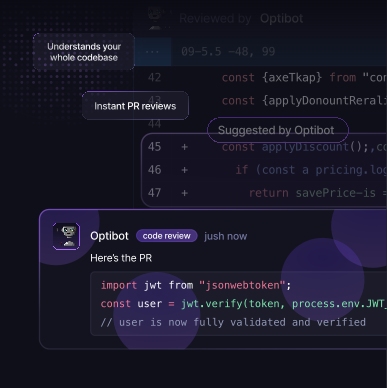
Optibot is a strong Greptile alternative for engineering teams that need full codebase context reviews plus features Greptile doesn't offer. Like Greptile, Optibot indexes your entire codebase and uses that context on every PR review, not just the changed lines. This means it catches the same class of bugs Greptile is known for: cross-file dependency breaks, logic issues that span multiple modules, and architectural regressions where a local change looks clean in the diff but breaks behavior in an unrelated service. Both tools take a full-context approach that puts them above diff-only reviewers on complex multi-file changes.
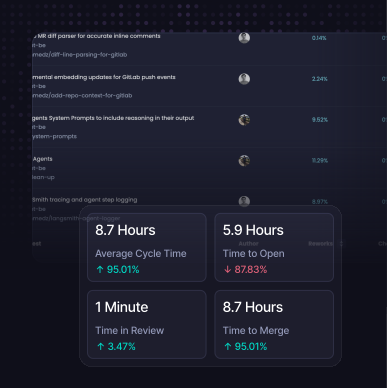
Where Optibot differs from Greptile: it adds a complete engineering analytics layer. PR cycle time, DORA metrics (deployment frequency, lead time for changes, change failure rate, time to restore), AI code adoption tracking, contributor productivity insights, and sprint health are all available inside the same platform as your code reviews. This means you can measure whether your AI code review investment is actually reducing cycle time and improving delivery without buying a separate analytics tool. Flat $29/user/month pricing means your costs are predictable regardless of how many PRs your team opens.
Pros
- Full codebase context (not diff-only) on every PR review
- Engineering analytics: cycle time, DORA, AI adoption, contributor metrics
- Flat $29/user/month, unlimited reviews, no usage surcharges
- GitHub + GitLab (cloud and self-hosted) with full feature parity
- VS Code and Cursor IDE extensions for in-editor fix resolution
- Multi-pass security scanning with CWE/CVE database coverage
- Autonomous CI fixing agent to close the loop on failing builds
- SOC 2 Type II certified
Cons
- No Bitbucket or Azure DevOps support (in development)
- No free tier for open-source public repositories
Want to see how Optibot compares to Greptile directly? See a detailed side-by-side breakdown of review quality, engineering analytics, platform support, and pricing.
Best for teams that want a widely-adopted AI reviewer with a generous free tier for public repos
CodeRabbit is the most widely deployed AI code review tool in 2026, with strong brand recognition and a large community of users. It installs quickly as a GitHub or GitLab App, provides inline PR comments, and generates walkthrough summaries that give reviewers a quick orientation to what changed and why. For teams that want fast time-to-value and a tool their engineers have likely already encountered, CodeRabbit is a low-friction starting point.
CodeRabbit maintains a semantic index of your codebase (including dependency graphs, embeddings of functions and classes, and prior PR history) so it operates with broader context than a pure diff-only reviewer. That said, the depth and comprehensiveness of cross-file bug detection differs from purpose-built full-context tools like Optibot and Greptile, which index the full repository as their core analysis approach rather than as a supplementary feature. The key practical gaps compared to Greptile and Optibot are: there is no engineering analytics layer (no cycle time, DORA metrics, or AI adoption tracking), pricing scales with PR volume rather than per seat, and there are no IDE extensions for resolving findings directly in the editor.
Pros
- Fast installation, low setup friction
- Free tier for public/open-source repositories
- GitHub and GitLab support
- PR walkthrough summaries and inline comments
- Large user community and extensive documentation
Cons
- No engineering productivity metrics or analytics
- Usage-based pricing scales with PR volume
- No IDE extension for in-editor fix resolution
Best for enterprise teams on Bitbucket or Azure DevOps with strict governance and compliance requirements
Qodo offers both a coding assistant (Qodo Gen) and a dedicated PR review product (Qodo Merge). Its most distinctive strength is platform coverage: GitHub, GitLab, Bitbucket, and Azure DevOps are all supported, making Qodo one of the few serious options for organizations that have not yet consolidated onto GitHub or GitLab. The rules engine is a standout feature for large enterprises: it allows teams to define and enforce custom coding standards, compliance rules, and review policies consistently across all pull requests.
For teams switching from Greptile, the main tradeoff is complexity: Qodo's dual-product architecture adds configuration overhead that Greptile and Optibot avoid. Pricing is less transparent, and like Greptile, there are no built-in engineering analytics. The sweet spot for Qodo is organizations with genuine Bitbucket/Azure DevOps requirements and compliance-driven review policies; teams outside those constraints will find simpler tools better suited to their needs.
Pros
- Broadest platform coverage: GitHub, GitLab, Bitbucket, Azure DevOps
- Powerful rules engine for enforcing coding standards at scale
- Dual product: coding assistant + PR review in one vendor
- Enterprise governance, compliance, and self-hosted deployment options
Cons
- More complex setup and configuration than Greptile or Optibot
- No engineering productivity analytics
- Non-transparent pricing requires a sales conversation
- Dual-product overhead adds friction for smaller teams
"The real difference between good and great AI code reviewers isn't the model they're built on: it's whether they can see your whole codebase or just the diff. A 50-line change can break behavior in ten other files. Diff-only tools will never know. Full-context tools catch what matters."
Best if your team is already on Copilot Business or Enterprise and wants basic coverage at no extra cost
GitHub added pull request review capabilities to Copilot Business and Enterprise in 2025. For teams already paying for Copilot at the Business or Enterprise tier, this provides automated code review comments on GitHub PRs at no additional per-seat cost. If you're switching away from Greptile primarily because of cost, and your team is already on Copilot, it's worth evaluating what you get from the bundled tier before adding another paid tool.
The limitations are significant compared to Greptile: GitHub Copilot Code Review uses diff-only analysis with no full codebase indexing, meaning it misses exactly the class of bugs that made Greptile attractive in the first place. It is GitHub-only, so teams on GitLab can stop reading here. There are no engineering analytics, and review quality consistently trails purpose-built reviewers like Optibot and Greptile in head-to-head evaluations on complex multi-file changes.
Pros
- Included with Copilot Business ($19/user/mo) and Enterprise ($39/user/mo) at no extra cost
- Zero additional setup for teams already using GitHub Copilot
- Native GitHub UI with no third-party app required
Cons
- Diff-only: no full codebase context, misses cross-file bugs
- GitHub only: no GitLab, Bitbucket, or Azure DevOps
- No engineering analytics or velocity metrics
- Review quality behind Greptile and Optibot on complex changes
Best for AWS-heavy organizations that want infrastructure-aware code review within the AWS ecosystem
Amazon Q Developer (formerly CodeWhisperer) is a broad development tool that includes code suggestions, security scanning, and pull request review capabilities. Its specific advantage over generic AI reviewers is AWS context: for codebases heavy in CDK, CloudFormation, IAM policies, Lambda, and other AWS services, Q Developer understands the infrastructure patterns and can flag misconfigurations at the code level that a tool without AWS-specific training would miss. For organizations standardized on the AWS ecosystem, this domain-specific knowledge is a genuine differentiator.
Outside the AWS ecosystem, the advantages largely disappear. General application code review quality is comparable to GitHub Copilot Reviews, adequate for basic coverage but not competitive with full-context tools like Greptile or Optibot on complex multi-file changes. The AWS Builder ID or IAM Identity Center requirement adds authentication friction for teams not already embedded in the AWS ecosystem, and there are no engineering analytics.
Pros
- Deep AWS-specific security and configuration scanning (IAM, S3, CDK, Lambda)
- Free tier available for individual developers
- VS Code, JetBrains, and AWS Cloud9 IDE integration
- Native integration with AWS services and CI/CD pipelines
Cons
- Strong value only for AWS-heavy codebases; thin advantage elsewhere
- No full codebase context for general PR review
- No engineering analytics or cycle time metrics
- Requires AWS Builder ID or IAM Identity Center; adds friction
Best as a complementary CI quality gate alongside an AI reviewer; not a direct Greptile replacement
SonarCloud is the cloud edition of Sonar's mature static analysis platform, used by tens of thousands of teams worldwide to enforce code quality thresholds and detect known vulnerability patterns. It is a different category from Greptile and Optibot: a static analysis gate rather than an AI contextual reviewer. SonarCloud excels at enforcing coverage regression rules, blocking merges on quality violations, and detecting OWASP and CWE-classified security hotspots through pattern matching across 27+ languages.
The complementary use case is worth considering: many teams run SonarCloud as a CI gate to enforce quality floors and catch pattern-matched security vulnerabilities, while running Optibot or Greptile as the contextual AI reviewer to catch logic bugs and architectural issues that require codebase understanding. SonarCloud and an AI reviewer are not substitutes for each other; they catch different classes of problems. SonarCloud has a free tier for public repositories, which makes it easy to layer in at no cost on open-source projects.
Pros
- Mature, battle-tested static analysis across 27+ languages
- Strong OWASP Top 10 and CWE security hotspot detection
- Free tier for public and open-source repositories
- CI/CD quality gate enforcement with configurable quality profiles
- GitHub, GitLab, Bitbucket, and Azure DevOps support
Cons
- No AI contextual understanding: misses logic and architectural bugs
- Cannot reason about how changed code affects the broader codebase
- No AI narrative review comments or PR summaries
- No engineering productivity analytics
- High false-positive rate on complex, non-standard codebases
Best if your entire team codes in Cursor and values tight IDE-to-PR integration
Cursor launched BugBot in mid-2025 as a GitHub PR review add-on for teams using the Cursor IDE. It leverages Cursor's existing codebase indexing to review pull requests, which gives it reasonable contextual understanding (better than pure diff-only tools, closer to Greptile-class review quality on repos that Cursor has fully indexed). Setup is seamless for existing Cursor users because the codebase index is already built as part of normal Cursor usage.
The fundamental limitation is that BugBot is not a standalone tool: it is an add-on to a specific IDE. Its value proposition only holds if your entire engineering team uses Cursor as their primary editor. Mixed IDE environments (some engineers on VS Code, some on JetBrains, some on Cursor) make BugBot impractical. The cost math is also unfavorable: as of June 2026, BugBot switched to usage-based billing at approximately $1.00–$1.50 per review run, on top of the required Cursor Business subscription at $40/user/month. Total spend varies with review volume and can be difficult to predict, whereas Optibot delivers comparable or better review quality at a flat $29/user/month with no per-run charges. No engineering analytics are included.
Pros
- Tight integration with Cursor's existing codebase index
- Zero additional setup for teams already using Cursor Business
- GitHub PR integration with inline comments
- Better-than-diff-only context on repos Cursor has indexed
Cons
- Only practical if the entire team uses Cursor IDE; not standalone
- Usage-based billing (~$1–$1.50/run) on top of required $40/user/month Cursor Business subscription; total cost varies unpredictably with review volume
- No engineering analytics or cycle time tracking
- Limited GitLab support; primarily GitHub-focused
Quick comparison: all 7 alternatives at a glance
| Tool | Full codebase context | Eng. analytics | GitLab support | Pricing model |
|---|---|---|---|---|
| Optibot | ✓ | ✓ | ✓ | $29/user flat |
| CodeRabbit | Partial | ✗ | ✓ | Usage-based |
| Qodo | ✓ | ✗ | ✓ | Freemium / Enterprise |
| GitHub Copilot | ✗ | ✗ | ✗ | Bundled w/ Copilot |
| Amazon Q | ✗ | ✗ | Partial | Free / $19/user |
| SonarCloud | ✗ | ✗ | ✓ | Usage (lines of code) |
| Cursor BugBot | Partial | ✗ | ✗ | Usage-based + $40 Cursor sub |
What Greptile does well
Greptile has genuine strengths, and switching away from a tool that's working is never free. Greptile's core proposition (indexing your full codebase and using that context for every PR review) is technically sound and meaningfully better than diff-only tools. Its codebase search capabilities are strong, and for teams that want to ask natural language questions about their codebase alongside receiving PR reviews, Greptile's search UX is thoughtful and well-executed. The review quality on complex multi-file changes is legitimately good: Greptile consistently catches the kinds of cross-file dependency issues and logic regressions that simpler tools miss entirely.
Greptile continues to make the most sense for small-to-mid-size GitHub-native teams that prioritize review quality, don't need engineering velocity reporting, and are comfortable with usage-based pricing at their current PR volume. If that describes your team, the switching cost may not justify moving to a different tool. The scenarios where Greptile is a less natural fit: teams on GitLab (especially self-hosted), teams where usage-based pricing has compounded as velocity increased, and teams that need to measure the ROI of their code review investment through engineering metrics. Those are the situations where the alternatives in this guide are worth evaluating.
How to choose the right Greptile alternative
The decision tree is simpler than the number of options makes it appear. Start with these questions:
- Do you need engineering analytics (cycle time, DORA, AI adoption) alongside code review? If yes, only Optibot provides this in a single platform. Every other tool on this list requires a separate analytics product.
- Do you use GitLab, especially self-hosted? Optibot and Qodo both support self-hosted GitLab with full feature sets. Greptile and most others have limited or no self-hosted GitLab support.
- Is usage-based pricing causing cost predictability problems? Switch to Optibot's flat $29/user/month. Your bill won't grow as you ship more.
- Do you need Bitbucket or Azure DevOps? Qodo is the strongest option in that case, with CodeRabbit as an alternative.
- Are you an AWS shop that wants infrastructure-aware scanning? Consider Amazon Q Developer as a complementary tool rather than a primary reviewer.
- Do you want a CI quality gate for known vulnerability patterns and coverage enforcement? SonarCloud complements any AI reviewer and works well alongside Optibot or Greptile.
- Is your entire team using Cursor IDE? Cursor BugBot is convenient, but factor in usage-based review charges (~$1–$1.50/run) on top of the $40/user/month Cursor Business subscription and compare against Optibot's flat $29/user/month before committing.
Every tool on this list has a free trial, free tier, or both. The most reliable evaluation method is connecting two or three candidate tools to a real private repository simultaneously and running them in parallel for two to three weeks of actual PR history. Pay particular attention to multi-file changes (refactors, service extractions, API changes that span multiple layers). That is where full-context tools separate themselves from diff-only tools, and where you'll see the clearest difference between alternatives.
Conclusion
Greptile sits in the right category: full codebase context for PR review is a sound technical approach, and meaningfully better than diff-only alternatives. The reasons teams switch away are specific and consistent: usage-based pricing that compounds with velocity, GitHub-first design that creates friction on GitLab, and the absence of engineering analytics.
For most teams evaluating Greptile alternatives, Optibot is the clearest recommendation. It is the only tool on this list that combines full codebase context, built-in engineering analytics (cycle time, DORA metrics, AI adoption tracking), first-class GitLab support including self-hosted instances, and flat per-seat pricing in a single product. The analytics layer alone makes it the default choice for any team that needs to measure the impact of their code review investment or report engineering velocity to leadership. If those are not requirements and you specifically want full-context reviews without analytics at a usage-based price, Greptile remains a legitimate option. Teams with a hard requirement for Bitbucket or Azure DevOps should evaluate Qodo. Start a free Optibot trial to see how it performs on your actual codebase.